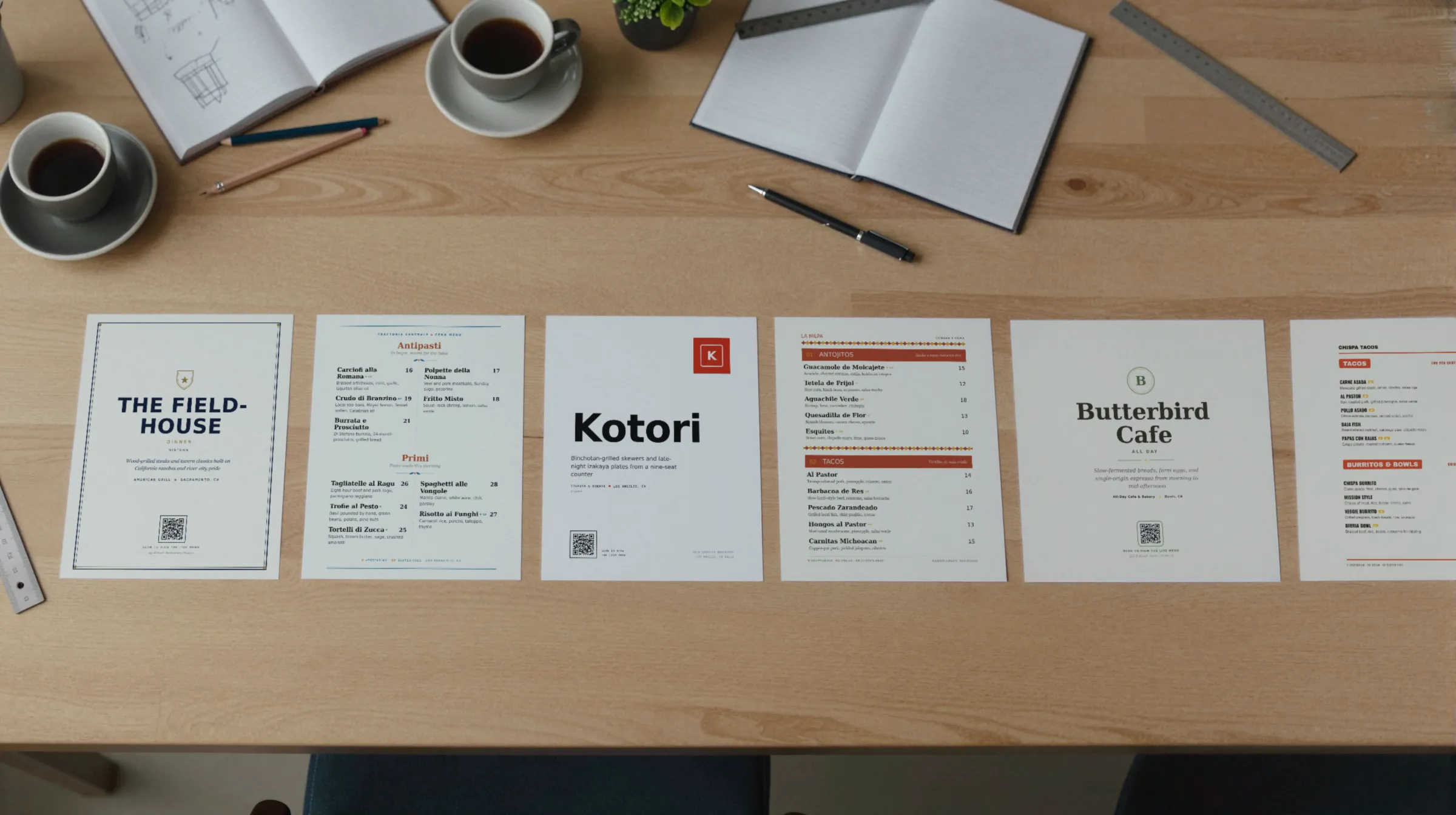
Restaurant menu design starts with hierarchy
A guest should be able to tell four things apart at a glance: the section, the dish, the price, and the description. Each one gets its own treatment, and each treatment is used the same way everywhere on the menu.
- Section heads are the largest, or set in caps, so the eye can jump from Starters to Mains without reading anything between.
- Dish names come next: larger or bolder than the description, and written to say what the dish is. “Short rib, polenta” beats a name the server has to explain.
- Prices sit in one consistent place on every line.
- Descriptions are the quietest thing on the page: smaller, lighter, or italic.
When everything is bold, nothing is. The test is simple: hold the menu at arm’s length and squint. You should still see the sections and the dish names. If you see a gray block, the hierarchy is too flat.
Menu layout: section order and length
Order the sections the way the meal is eaten: small plates, then mains, then sides, then dessert, with drinks either first or on their own page. An Italian menu runs antipasti, primi, secondi, contorni, dolci. A café runs by daypart, with the hours in a note beside the heading. Guests who know your kind of place navigate by that order; guests who do not learn it from you.
Keep each section short enough to hold in your head. Gaslamp caps a menu at twelve sections of twenty items, but if a section runs past a dozen, it is usually two sections, or a second menu. A long wine list, a cocktail list, or a brunch menu can live as its own menu with its own QR code.
Where prices go: dot leaders, right-aligned, or inline
There are three common ways to place a price, and all three work if you use one of them everywhere.
| Style | How it reads | Gaslamp designs that use it |
|---|---|---|
| Dot leaders | A dotted line carries the eye from the dish name to a price at the right edge. Traditional, very easy to scan. | Classic American |
| Right-aligned | Prices in a clean column on the right, no leaders. Fast to read from a distance. | Food Truck, with big prices on the right |
| Inline or under the name | The price follows the dish name, or sits just beneath it. Keeps the eye on the dish first. | Modern Asian (right after the name), Casual Café (under the name) |
You will read that one of these makes guests spend more, or that dropping the dollar sign does. Those claims get repeated a lot, and the evidence behind them is thin. Pick the style that suits the room and makes the price easy to find. Guests who have to hunt for a price do not trust it.
Menu design tips for the details
- Description length. One line, two at most: the main ingredient and two supporting ones. Adjectives like “delicious” and “house-made” rarely earn their space.
- Dietary marks. Use small marks beside the dish and a key at the foot of the page, not a paragraph under every item. Gaslamp tags vegetarian, vegan, gluten-free, dairy-free, nut-free, spicy, halal, and keto.
- Type size and reading distance. Size the type for your darkest table and your oldest regular. A candlelit bistro needs larger text than a sunny café counter; a truck board has to read from the back of the line. Print a test page and read it where guests will.
- One accent color. One color for section heads or rules, and ink for everything else. A second accent starts to compete with the food. Gaslamp’s design controls take one accent color.
- Photos on the phone, not the paper. On a printed menu photos crowd out dishes and date the page the day a plate changes. On a phone they help. Gaslamp shows item photos on the hosted menu only and keeps the print PDF to type.
The eight Gaslamp designs
Each design is drawn for a kind of room. You can see every one of them rendered on the samples page, or download a finished sample PDF from the menu templates.
| Design | The look | Layout | Suits |
|---|---|---|---|
| Classic American | Navy and brass on cream, small-caps section heads, a double rule around the page | Leader dots out to a right-aligned price | Steakhouses, grills |
| Coastal Mediterranean | Aegean blue and coral on off-white, open margins | Two columns a page, a line in italics under each section name | Trattorias, seafood |
| Modern Asian | Ink black and one lacquer red, generous white space | A numbered rail down the left, the price right after the dish name | Sushi, izakayas |
| Latin American | Terracotta and marigold on warm cream | Bold banded section heads, tile-inspired dividers | Taquerias, Latin kitchens |
| Upscale Contemporary | Charcoal and gold on warm white, fine rules, no decoration | Roman-numeral courses, restrained spacing | Fine dining, tasting menus |
| Casual Café | Kraft tones with a sage accent | One stacked column, the price under each name | Cafés, brunch, bakeries |
| Elegant Landscape | Olive ink on warm paper, letterspaced section heads | Letter turned sideways, two columns split by a hairline | Wine bars, bistros |
| Food Truck | Kraft paper, red-orange section tabs | Condensed caps for dish names, big prices on the right | Trucks, counters, pop-ups |
Within any design you set your logo, one accent color, and a choice of six fonts. The layout reflows around your dishes, so you are not fitting words into boxes someone else drew.
Any design is one click from any other
Your menu is stored as content, not as a layout. Switch from Casual Café to Classic American and every section, dish, price, description, and dietary tag comes with it. Nothing is retyped. That makes trying designs cheap: type the menu in once, flip through all eight on your own dishes, and keep the one that looks like your room.
It also means the redesign two years from now is an afternoon, not a project. The same menu feeds the print-ready PDF and the hosted QR menu, so both change together. More on the paper side on the printable menu page, and on the phone side on the digital menu page.
What Gaslamp does not do
- It does not offer free-form layout. You pick one of eight designs and adjust the logo, accent color, and fonts; you do not drag boxes around a page.
- Up to three labeled prices per item, from $1 to $9,999. Every line needs a number.
- No multi-language menus or translation.