Pizza menu template
Red pies and white pies in two sizes on one line each, toppings priced by size, slices at the counter, starters, and a short drinks list. This is a sample pizzeria menu set in Gaslamp’s Classic American design.
No card needed · then $19/mo or $190/yr · cancel anytime
The real menu, first two pages
The sample runs Red Pies, White Pies, Toppings, By the Slice, Salads and Starters, and Drinks and Dessert. Each pie is one line with two labeled prices, 12 inch and 16 inch, so the sizes read side by side.
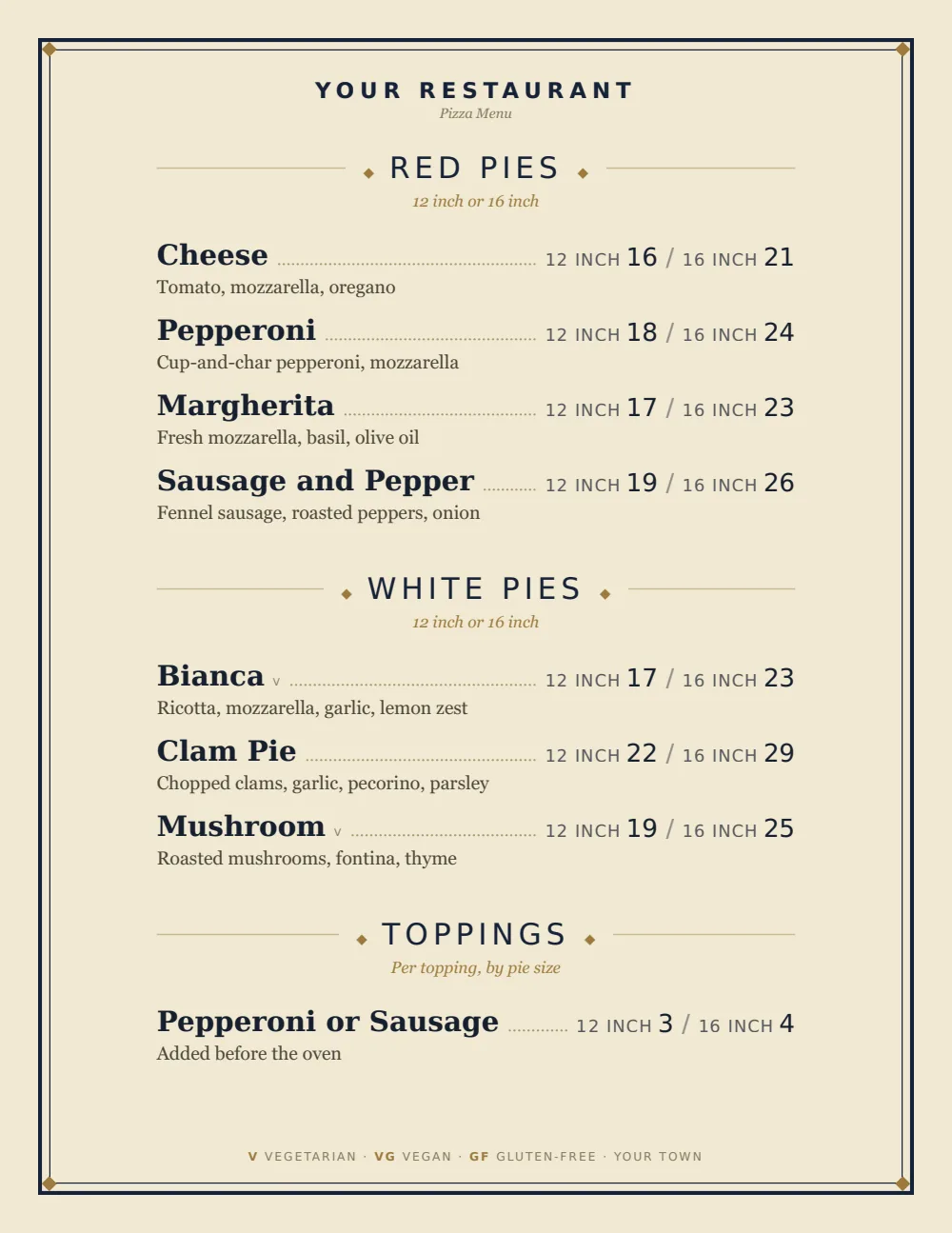
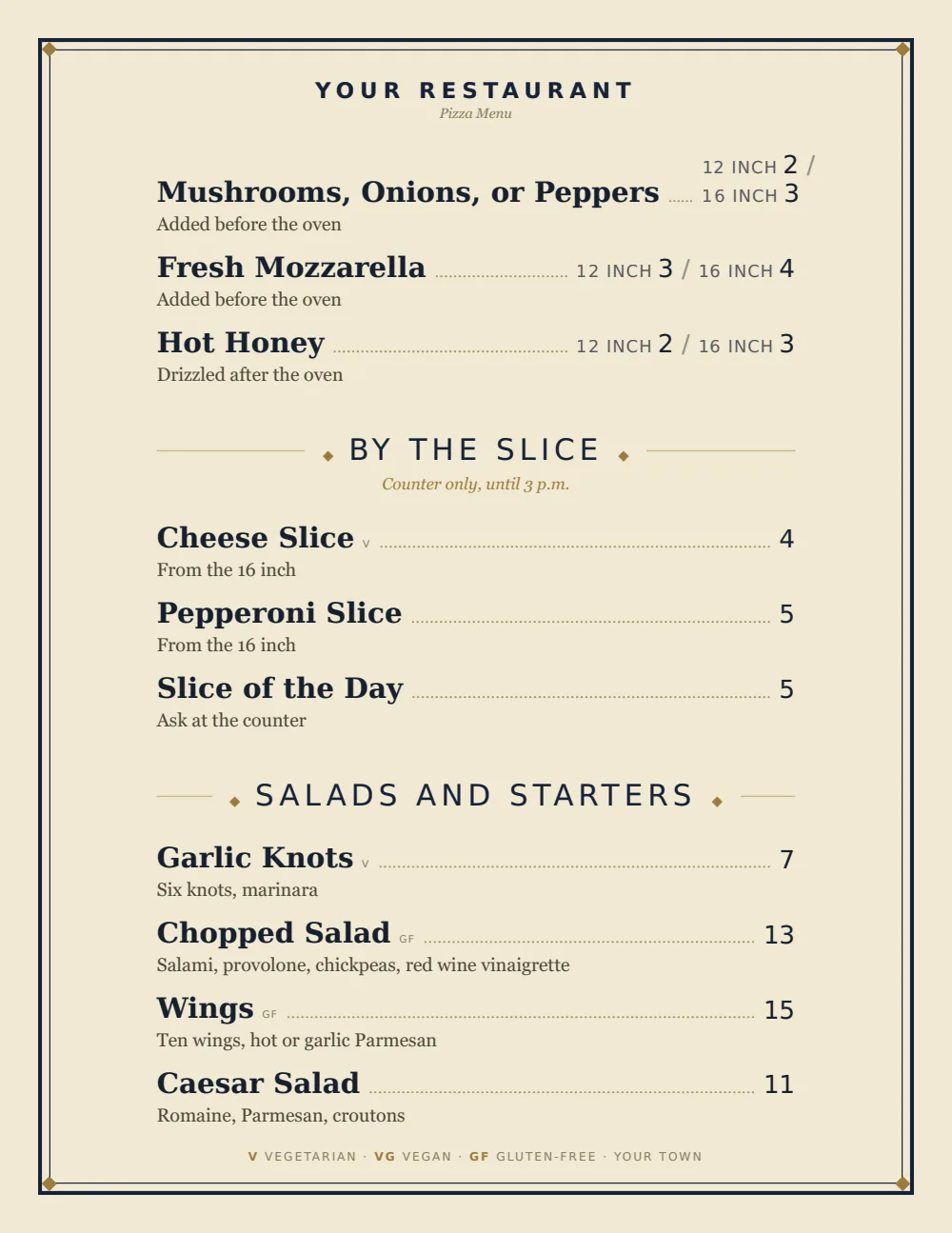
Sample menu. Dishes and prices are examples. Want to see one on a phone? Scan a live sample menu.
- The filePDF, 122 KB
- Pages4, with a coverThe cover carries the name and a QR code to the live menu.
- PaperUS Letter, portrait
- To download and printfree
No signup, no email. It is a finished sample, so it carries sample dishes. Putting your own menu into it takes the free trial. The trial includes one published live menu with QR codes. PDF downloads and additional menus start when you pick a plan.
What belongs on a pizza menu
A pizza menu is a small grid in disguise: every pie in every size, plus toppings that change the price. The design job is to make that grid readable without printing a table.
Red pies, by size
One line per pie with a price for each size you sell, up to three. The sizes go in the note under the heading too, for anyone ordering by phone.
- Cheese12 inch 16 / 16 inch 21
- Pepperoni12 inch 18 / 16 inch 24
White pies
No tomato, split out so the guest looking for one finds it. A clam pie or a ricotta pie usually lives here.
- Bianca17
- Clam pie22
Toppings
Priced per topping for each size, with the same labels as the pies, so the counter never has to work out the large.
- Pepperoni or sausage12 inch 3 / 16 inch 4
- Mushrooms, onions, or peppers12 inch 2 / 16 inch 3
By the slice
For the counter, with the hours in the note. Two or three slices and a slice of the day.
- Cheese slice4
- Slice of the day5
Starters, salads, drinks
Garlic knots, wings, a chopped salad, fountain sodas, a cannoli. Short and cheap to make from pizza prep.
- Garlic knots7
- Cannoli5
Example lines and prices show format only. They are not pricing advice.
How Classic American sets it
Classic American sets one centered column with dotted leaders to the price, which reads the size grid well: each pie’s 12 inch and 16 inch prices sit side by side at the end of its leader, labeled in small caps.
Section notes print in italic under the heading, so the size rule and the topping rule each take one line. That keeps the pie descriptions to ingredients only.
Pizzerias print a lot of takeout menus. The PDF’s cover carries the QR code to the live menu; print it on the takeout menu too, so a menu on someone’s fridge still opens tonight’s prices.
Prices on a pizza menu
Sizes are labeled prices on one line: up to three per pie (a 10 inch, a 12 inch, a 16 inch). Toppings take the same labels, so the upcharge for each size sits beside it.
Toppings are one line each with a price per size. The section note only has to say they are per topping.
Cheese prices move more than most ingredients. When they do, the menu price increase calculator rounds a percent increase across every pie the way menus round.
Set it up in Gaslamp
- 1
Start from this pizzeria menu
Pick Classic American and start from this sample. Every section, line, and price is already in place, so you type your own over it instead of building a blank page.
- 2
Type your dishes over it
Replace each name, description, and price in the editor. Delete the lines you do not serve and add the ones you do. The layout reflows as you type.
- 3
Label the sizes
Give each pie a labeled price per size (12 inch, 16 inch) and state the sizes you sell in the note under Red Pies.
- 4
Publish, then print
Publish the live menu behind one QR code that never changes, print the table tents once, and print the PDF whenever the paper copy needs to catch up.
Running it
6:45 p.m.
Out of clams
The clam pie sold through. Mark it sold out on your phone and save; the QR menu shows it struck through before the next order at the counter.
11:00 a.m.
Cheese went up
The distributor raised mozzarella. Change the pie prices before open and save; the QR menu is right by lunch. Print fresh takeout menus when the stack runs low.
Pizza menus, straight answers
- Is this pizza menu template free?
- Yes. The Classic American PDF on this page is free to download and print, with no signup. It is a sample, so it carries sample dishes and prices. To put your own menu into the design, start the 14-day free trial, no card needed. The trial includes one published live menu with QR codes. PDF downloads and additional menus start when you pick a plan.
- How do I list pizza sizes on a menu?
- One line per pie with a labeled price per size: Cheese, 12 inch 16 / 16 inch 21. An item holds up to three sizes. Put the sizes you sell in the note under the heading as well.
- How should toppings be priced?
- One line per topping at the base-size price, with the rule for larger pies in the section note.
- Can I print takeout menus from this?
- Yes, on a paid plan. Download the PDF and print it; the cover carries the QR code to your live menu.
- Does it take online orders?
- No. Gaslamp is the menu guests read. Online ordering and POS stay in the tools you use now.
- How much does it cost?
- Start with a 30-day free trial, no credit card needed. Then it is $19 a month, or $190 a year (2 months free). No setup fee. Cancel anytime. The trial includes one published live menu with QR codes. PDF downloads and additional menus start when you pick a plan.
If you run one
Every design takes every menu. Switch between them anytime and your dishes stay put.
For the day-to-day, menu software for pizzerias covers what changes on menus like yours and how often.
The free QR code menu generator makes a code for whatever menu you have now.
All menu templates
The clam pie sold out at 6:45. Take it off before the next call.
No card needed · then $19/mo or $190/yr · cancel anytime