Winery tasting room menuThe 2021 reserve is gone. The flight card still lists it.
A tasting room menu is really three lists: the flights poured at the bar, the wines sold by the glass on the patio, and the bottles guests carry to the car. Library wines run out, a new release goes into the flight on a Saturday, and the cheese board changes with whatever the kitchen or the cheesemonger sent. Gaslamp keeps those as menus you change from a phone behind the tasting bar, with one QR code per menu that never changes.
No card needed · then $19/mo or $190/yr · cancel anytime
What changes on a tasting room menu, and how often
A menu is designed once and edited forever. These are the edits this kind of place makes, and what each one takes in Gaslamp.
| The change | How often | In Gaslamp |
|---|---|---|
| A library or small-lot wine sells through | A few times a month in season | Mark the wine sold out on the bottle list and edit the flight it sat in, then save. The QR menu shows it struck through about thirty seconds later. |
| The flight lineup rotates | Weekly or with each release | Keep each flight as one item at its price, with the four or five pours written in the description. Rewrite the description on release morning. |
| A new vintage replaces the old one | Once a year per wine | Edit the name and the tasting note in place. Last year’s wording stays in version history, which keeps the last 50 saves. |
| Harvest weekends and event days | Most weekends from late summer | Build a shorter event menu ahead of time as its own menu with its own code, and put those table tents out that morning. |
| The food board changes | With every cheese or charcuterie delivery | Rename the board, change what is on it in the description, and hide it when the kitchen closes. |
2:40 p.m.
Last case of the reserve went at 2:40. Off the list at 2:41.
A group on the patio just bought the last case of the 2021 reserve. Behind the tasting bar, open Gaslamp on your phone, mark the wine sold out on the bottle list, take it out of the Reserve flight description, and tap Save & update live menu. The next table that scans the code sees it struck through, and the flight lists what is actually in the cellar.
The editor runs in your phone’s browser; there is no app to install. The menu rebuilds in about two seconds, and phones that scan the code see the change about thirty seconds after you save.
Your phone

The menu

How winery tasting rooms set up their menus in Gaslamp
Menus
- Tasting menuFlights, wines by the glass, the board, non-alcoholic
- Bottle listEvery wine for sale by the bottle, on its own code at the register
- Event menu (optional)A shorter list for harvest weekends and private tastings
Sections, for example
- Flightsthree or four, one line each, pours in the description
- By the glassabout 8
- Whites & rosébottles
- Redsbottles
- Reserve & librarysmall lots, hidden when gone
- Sparkling & dessertbottles
- From the kitchenboards and small plates
- Non-alcoholicjuice, sparkling water, a zero-proof spritz
A menu holds up to twelve sections of twenty items. A tasting room can keep flights, glasses, and bottles on one menu, with Glass and Bottle as two labeled prices, or put the bottle list on a second menu with its own code at the register.
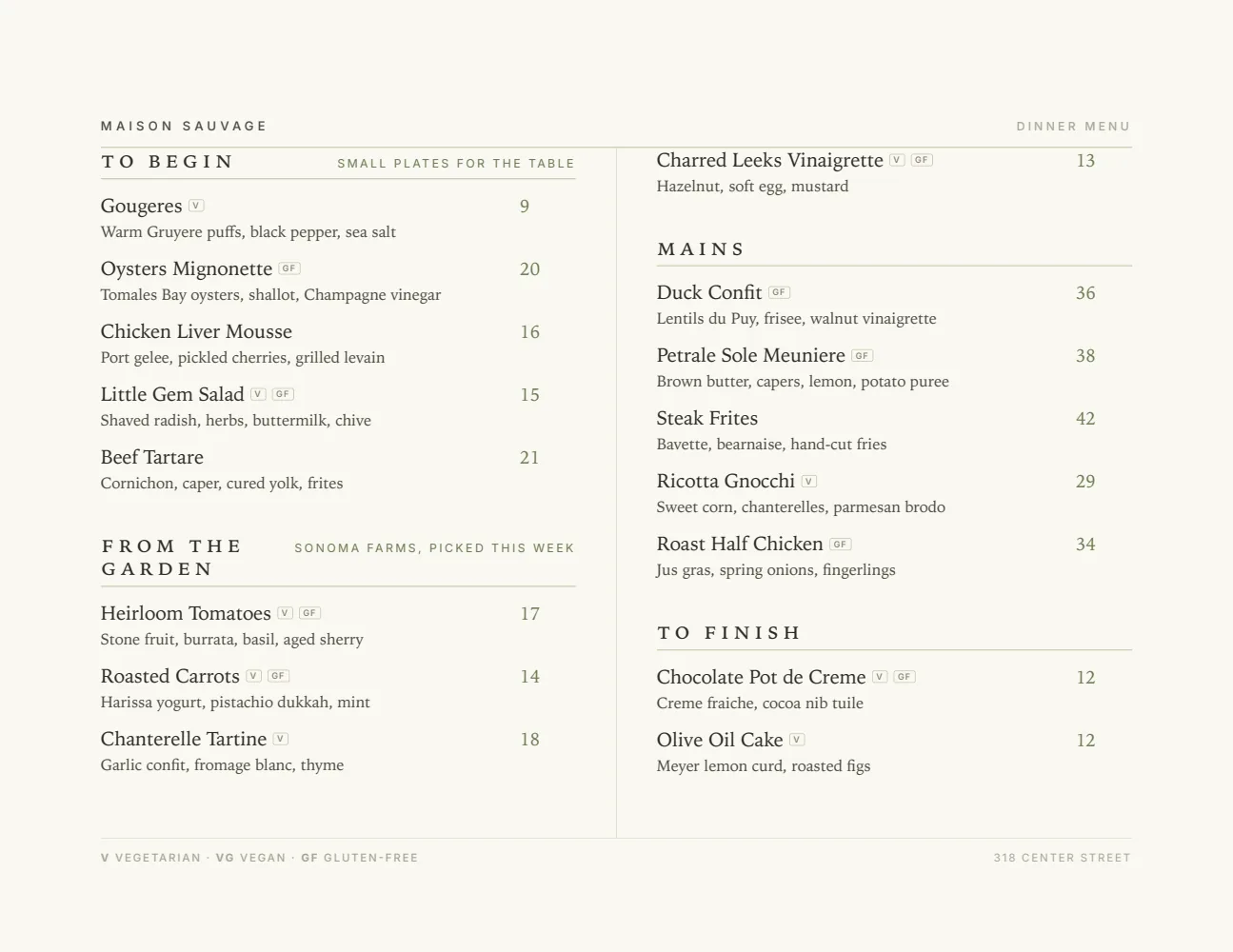
Start with Elegant Landscape
A wide page in two columns reads like a wine list should: the name and region on the left, the tasting note under it, the price out at the end of the line. It sits flat on a tasting bar without folding.
Start from the sample menu set in Elegant Landscape, then type your dishes and prices over it in the editor. After that, the job is keeping it right from your phone. See the free template for the full layout.
Where the QR code goes
Each menu gets one code, and it never changes. Print it once; every edit after that shows up behind it. Gaslamp makes the printable pieces for you.
From the floor: Keep the printed flight card for the bar, where people like something to write on, and put the QR on the patio tables. The patio is where the list goes stale, because nobody walks back inside to ask what is left.
- Table tenton every patio table, where people decide on a second glass or a bottle to take home
- Tasting bar cardevery few feet along the bar, so the flight notes are on each guest’s phone while they taste
- Counter cardat the register, pointing to the bottle list with today’s prices
Good to know before you start
- Up to three labeled prices per item, so a wine shows Taste, Glass, and Bottle on one line. A club price would be a fourth, so say it once in the note under the heading.
- Prices go up to $9,999 per item, so large formats and library bottles carry their real prices.
- No wine club logins or member pricing. If club members get a discount, say so once in the note under the heading; the hosted menu is a public page anyone with the code can read.
- Gaslamp does not sell or ship wine, take tasting reservations, or sync with a winery POS or club platform. Prices change in those systems separately.
Tasting room menu questions
- How do I list a tasting flight on a QR menu?
- Make each flight one item at its price, with the pours in the description in the order you serve them, for example “Sauvignon Blanc, Chardonnay, Pinot Noir, Syrah”. When a wine in the flight changes, rewrite the description and save; phones scanning the code show the new lineup about thirty seconds later.
- Can the menu show glass and bottle prices for the same wine?
- Yes. An item takes up to three labeled prices, so one line can show Glass and Bottle, or Taste, Glass, and Bottle. A separate bottle list with its own code is optional and needs a paid plan; the trial includes one live menu.
- What happens when a library wine sells out?
- Mark it sold out and save. The hosted menu behind your QR code shows it struck through with a “Sold out” label, and the next printed PDF leaves it off. If the wine was part of a flight, edit that flight’s description too.
- Can I print a flight card for the tasting bar?
- Yes, on a paid plan. Download the print-ready PDF of the tasting menu and print it on your own printer or at a shop. The PDF comes from the same edit as the QR menu, so the card and the phone agree.
- How much does it cost?
- Start with a 30-day free trial, no credit card needed. Then it is $19 a month, or $190 a year (2 months free). No setup fee. Cancel anytime. The trial includes one published live menu with QR codes. PDF downloads and additional menus start when you pick a plan.
The cellar changes every weekend. The list on the patio can too.
No card needed · then $19/mo or $190/yr · cancel anytime