Fast casual and counter service menu makerChicken went up fifty cents. The board still says 12.95.
A counter-service menu is read standing up, from ten feet away, while the line moves. It is bowls with add-ons, a limited-time item every few months, and prices that move when chicken does. Gaslamp keeps the menu board PDF, the QR on the line sign, and the to-go menu as one menu you edit from your phone before the lunch rush.
No card needed · then $19/mo or $190/yr · cancel anytime
What changes on a counter-service menu, and how often
A menu is designed once and edited forever. These are the edits this kind of place makes, and what each one takes in Gaslamp.
| The change | How often | In Gaslamp |
|---|---|---|
| A protein cost moves | A few times a year | Change the bowl prices on your phone. The QR menu follows about thirty seconds after you save; print a new board PDF for the wall. |
| A limited-time item launches | Every couple of months | Build it in a Limited time section ahead of time, hidden. Show it launch morning; hide it the day it ends. |
| An ingredient runs out | Most weeks | Mark the items that depend on it sold out. People reading the QR in line see them struck through and stop choosing them. |
| Add-on prices change | When the avocado market does | Add-ons are items with their own prices. Change the guac line once. |
| The board needs a reprint | After any price change that sticks | Download a fresh PDF and have a print shop enlarge it for the board. The QR code on the line sign never changes. |
10:45 a.m.
New chicken price at 10:45. Right on the QR before lunch.
The distributor’s invoice came in higher. Before the doors open, change the chicken bowl from 12.95 to 13.45 and tap Save & update live menu. The QR menu has it about thirty seconds later. The board over the counter is paper, so it keeps the old price until you print the new PDF.
The editor runs in your phone’s browser; there is no app to install. The menu rebuilds in about two seconds, and phones that scan the code see the change about thirty seconds after you save.
Your phone

The menu

How counter-service restaurants set up their menus in Gaslamp
Menus
- CounterBowls, plates, sides, drinks, add-ons
- Catering (optional)Trays and boxed lunches on their own menu and code
Sections, for example
- Bowlsthe base price for each, about 6
- Plates & wrapsabout 6
- Add-onsextra protein, guac, queso, each priced
- Sidesabout 6
- Kids3 or 4
- Drinksfountain, bottled, house lemonade
- Limited time1 or 2, hidden between launches
Up to twelve sections of twenty items each. Free choices (bases, sauces, toppings) go in the bowl descriptions; anything that costs extra is its own Add-ons item.
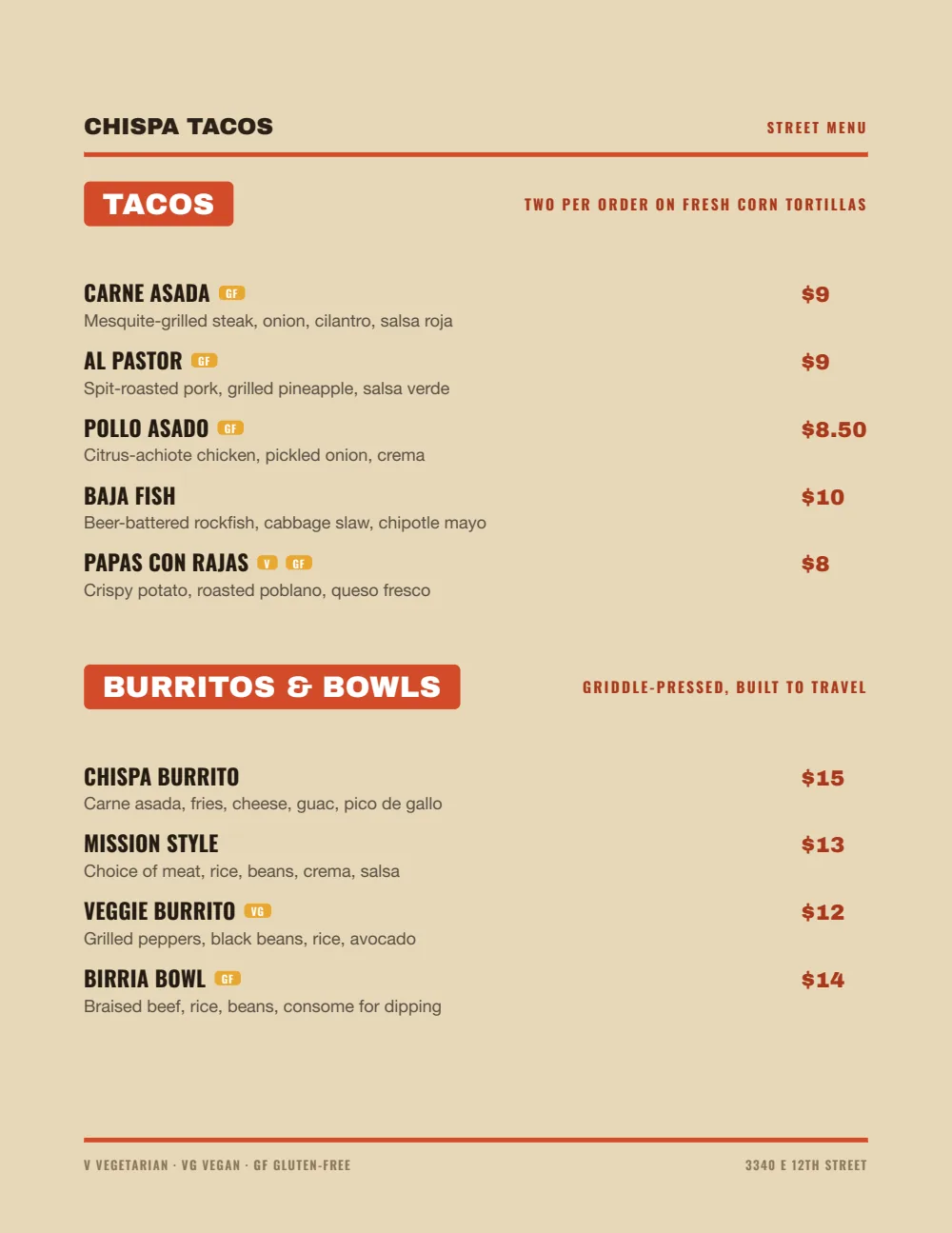
Start with Food Truck
Heavy names and big right-aligned prices, the closest of the eight designs to a menu board. It reads from the back of the line and on a phone from the same edit.
Start from the sample menu set in Food Truck, then type your dishes and prices over it in the editor. After that, the job is keeping it right from your phone. See the free template for the full layout.
Where the QR code goes
Each menu gets one code, and it never changes. Print it once; every edit after that shows up behind it. Gaslamp makes the printable pieces for you.
From the floor: Keep the board over the counter short: bowls, plates, and prices. Let the QR on the line sign carry the descriptions and add-ons, so the board does not turn into a wall of small type.
- Line signwhere the queue starts, so people decide before they reach the register
- Table tentfor the cookie or the second drink after the first tray
- Window signfor the office lunch crowd checking the menu from the sidewalk
Good to know before you start
- Build-your-own works as a base price on each bowl (up to three labeled prices, such as Regular and Large) plus priced Add-ons items; Gaslamp does not add up a total.
- No POS or delivery-app sync. A price change goes into your POS, each delivery app, and Gaslamp separately.
- The printed board does not update itself. The QR menu does; the board changes when you print the new PDF.
Counter-service menu questions
- How do I show build-your-own options on a menu board?
- Price the bowls, list the free choices in each description (“rice or greens, pick two sauces”), and put paid extras in an Add-ons section. Each extra is its own line with its price, so the upcharge is printed instead of quoted.
- Can I print a menu board for over the counter?
- Yes, on a paid plan. Download the print-ready PDF and have any print shop print it at board size. Gaslamp does not print or ship boards.
- How do I run a limited-time offer?
- Build it in its own section, hidden, before launch. On launch day, show it and save; hide it the day it ends. Gaslamp does not start or end items on a schedule.
- Does Gaslamp sync with my POS or DoorDash?
- No. Gaslamp is the menu people read on the board and behind the QR. Your POS and delivery apps keep their own menus, so a price change is made in each one.
- How much does it cost?
- Start with a 30-day free trial, no credit card needed. Then it is $19 a month, or $190 a year (2 months free). No setup fee. Cancel anytime. The trial includes one published live menu with QR codes. PDF downloads and additional menus start when you pick a plan.
The board is ten feet away and the QR is in their hand. Both can say 13.45.
No card needed · then $19/mo or $190/yr · cancel anytime